YouTube Accounts for Sale - Buy & Sell YouTube Channels

Monetized YouTube Accounts For Sale. Buy & Sell Channels with Active Subscribers & High Quality Views.

Sort By:
Title
price
feedback buy now
  1. Zhanalinov

    $60

  2. MasterTube
    Sticky Thread

     Selling Less Than 1k Subs    Original Owner (Yes) Selling LUXURY AGED YouTube Accounts (2006–2019)

    Price $:
    10
    MasterTube, 6/6/26
    Replies:
    1
    Views:
    134
    Last Reply:

    $10

  3. mystxcedits

    $5000

  4. Mhdeawad
    Sticky Thread

     Selling 10k-50k Subs  Other Monetization Disabled/No Strikes Original Owner (Yes) Selling a YouTube channel

    Price $:
    150
    Mhdeawad, 6/3/26
    Replies:
    0
    Views:
    36
    Last Reply:

    $150

  5. Bitara

    $1000

  6. Malik Sohail 04

    $179

  7. nevin67

    $15

  8. alejandro620

    $150

  9. voidbarry

    $400

  10. voidbarry

    $1000

  11. Gulfan

    $60

  12. Lyricall

    $79

  13. Nawaz ameer

    $5500

  14. Sarayahya

    $250

  15. Sarayahya

    $250

  16. nessheadbox

    $1000

  17. Prakashb727

    $85

  18. ShifoGaming

    $60

  19. Raza Mustafa
    Sticky Thread

     Selling      ✅Verified Account Selling Monetization Enabled YouTube Channels

    Price $:
    120
    Raza Mustafa, 5/26/26
    Replies:
    0
    Views:
    43
    Last Reply:

    $120

  20. shobolobo

    $18500

  21. bm06

    $80

  22. Veriffly
    Sticky Thread

     Selling 1000k+ Subs  Games Monetization Eligible Original Owner (Yes) Youtube accounts is available

    Price $:
    5000
    Veriffly, 6/12/26
    Replies:
    1
    Views:
    39
    Last Reply:

    $5000

  23. Dyean

    $180

  24. JHAKHAR BRAND

    $120

  25. baldwinn
    Sticky Thread

     Selling      AGED YOUTUBE CHANNEL 2006-2009 WITH VIDEO

    Price $:
    29
    baldwinn, 6/5/26
    Replies:
    0
    Views:
    44
    Last Reply:

    $29

  26. Anasnewm252010

    $180

  27. Naitik76145

    $700

  28. khori

    $349

  29. Ayana Tomer

    $700

  30. baldwinn
    Sticky Thread

     Selling      AGED Youtube channel 2021 - 2024 without video

    Price $:
    15
    baldwinn, 6/5/26
    Replies:
    0
    Views:
    27
    Last Reply:

    $15

  31. SocialTrust Hub

    $710

  32. SocialTrust Hub

    $335

  33. SocialTrust Hub

    $1470

  34. SocialTrust Hub

    $815

  35. SocialTrust Hub

    $325

  36. YTBiz

    $4500

  37. Ravex98
    Sticky Thread

     Selling     Original Owner (Yes) YouTube Premium – 12-Month Subscription – Only $29.99

    Price $:
    29.99
    Ravex98, 10/3/25
    Replies:
    2
    Views:
    250
    Last Reply:

    $29.99

  38. ProTTAccs
    Sticky Thread

     Selling 500k-1000k Subs   Monetization Ineligible Original Owner (Yes) YouTube account for sale

    Price $:
    3000
    ProTTAccs, 12/12/25
    Replies:
    1
    Views:
    94
    Last Reply:

    $3000

  39. Prakashb727

    $80

  40. Zyra X

    $90

  41. Ayansh gupta

    $95

  42. Abdullah7171

     Selling      Good Quality Gmails Available in bulk quantity

    Price $:
    0.30
    Abdullah7171, 7/4/26
    Replies:
    2
    Views:
    133
    Last Reply: Abdullah7171

    $0.30

  43. Ediizs

    $60

  44. LMF1102

    $50

  45. Atya

    $49

  46. abing

    $250

  47. maduranga99

    $100

  48. SHSAGA

    $1100

  49. Prakashb727

    $220

  50. Dil sharma

    $1999

Thread Display Options

Loading...


How to Securely Buy & Sell YouTube Accounts on PlayerUp

With the growing popularity of YouTube as a platform for content creation, entertainment, and business, owning a well-established YouTube channel can be a game-changer. Whether you’re looking to buy a channel with an established audience or sell one you've nurtured, PlayerUp offers a secure and user-friendly platform to facilitate the transaction. In this guide, we’ll walk you through the process of buying and selling YouTube accounts safely, as well as transferring ownership of a channel to a new buyer.


Why Choose PlayerUp for Buying and Selling YouTube Accounts?

PlayerUp stands out as a trusted marketplace for digital accounts and services. Here’s why it’s ideal for YouTube transactions:

  • Secure Middleman Services: PlayerUp’s middleman system ensures that payments and account transfers are handled securely, minimizing risks for both buyers and sellers.

  • Verified Listings: Many accounts on PlayerUp are verified to ensure authenticity and quality.

  • User-Friendly Platform: It’s easy to navigate, post listings, and communicate with potential buyers or sellers.

  • Wide Selection: You can find YouTube channels across various niches, subscriber ranges, and engagement levels.


For Buyers: How to Securely Purchase a YouTube Account

  1. Search for a Suitable Account

    • Browse PlayerUp’s YouTube listings to find a channel that meets your requirements, such as niche, subscriber count, and monetization status.

  2. Use the Middleman Service

    • Initiate the purchase through PlayerUp’s middleman service. This ensures your payment is held securely until the account is successfully transferred to you.

  3. Verify the Account Details

    • Request detailed analytics and screenshots from the seller to verify the channel’s performance and audience engagement.

    • Confirm monetization eligibility and any associated risks like copyright strikes or policy violations.

  4. Complete the Payment

    • Once satisfied with the account’s details, complete the payment via the middleman system.

  5. Transfer Ownership

    • Work with the seller to transfer the YouTube channel (details below).

    • Confirm the transfer with PlayerUp to release the payment to the seller.


For Sellers: How to Safely Sell Your YouTube Account

  1. List Your Account

    • Create a detailed listing on PlayerUp. Include key details such as subscriber count, niche, monetization status, and monthly revenue.

  2. Use the Middleman Service

    • Always use PlayerUp’s middleman service to handle the transaction securely. Avoid direct transactions to minimize risk.

  3. Communicate with Buyers

    • Respond promptly to inquiries and provide necessary details, such as screenshots of analytics, to build trust with potential buyers.

  4. Transfer the Channel

    • Once the buyer has completed payment through PlayerUp, follow the steps below to transfer the channel securely.

  5. Receive Payment

    • After the buyer confirms the successful transfer, PlayerUp will release the payment to you.


How to Transfer a YouTube Channel to the New Buyer

Transferring a YouTube channel involves granting ownership through Google’s settings. Here’s how:

  1. Add the Buyer as a Manager

    • Go to YouTube Studio.

    • Navigate to Settings > Permissions.

    • Click Invite and add the buyer’s email as a manager.

  2. Promote the Buyer to Primary Owner

    • After the buyer accepts the invitation, return to Settings > Permissions.

    • Change their role to Primary Owner.

    • Google requires a 7-day waiting period before the buyer becomes the primary owner.

  3. Remove Your Access

    • After the 7-day waiting period, the buyer can remove your access from the channel.

  4. Transfer Additional Assets

    • Share any associated assets, such as the Gmail account (if applicable), AdSense account, or branding materials, as agreed upon in the transaction.


Tips for a Secure and Successful Transaction

  • Verify Everything: Ensure the channel’s metrics, including subscribers and engagement, match the seller’s claims.

  • Avoid Scams: Only transact through PlayerUp’s middleman service to avoid fraud.

  • Document the Process: Keep records of all communication and agreements in case disputes arise.

  • Understand YouTube Policies: Ensure the account complies with YouTube’s terms of service to avoid potential issues post-transfer.


Conclusion

Buying and selling YouTube accounts on PlayerUp is a great way to jumpstart your content creation journey or monetize your hard work. By leveraging PlayerUp’s secure platform and following best practices for account transfer, you can ensure a smooth and risk-free transaction. Whether you’re a buyer or seller, the key to success lies in transparency, security, and effective communication.


.

--------------------------------------------------------------

.

Accounts

How can I verify that the seller is legitimately selling a real youtube channel?HideExpand

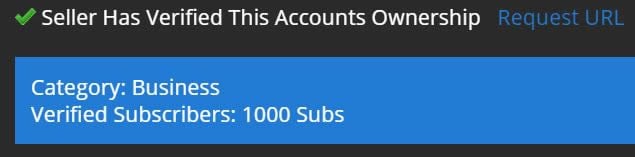
PlayerUp has an unique free tool that verifies that the youtube channel exists before the seller lists their youtube account for sale. Buyers can select the Verified Account tag search option under the Ownership category and filter youtube accounts for sale that have verified that their youtube channel exists.

Verified YouTube Channel, YouTube Account for Sale

Verified YouTube Channel, YouTube Account for Sale

For your security, before you do business with any seller on PlayerUp that doesn't have multiple positive feedback on previous transactions, it's important that you require the seller to verify that their youtube channel that they're selling exists to ensure you're protected and buying from a seller that actually owns the youtube account. If the seller is unable to verify ownership of this youtube channel, then they're potentially listing a youtube channel they don't own and you should use the Report feature and report this seller to PlayerUp so the moderators can investigate this seller and take action accordingly. PlayerUp does all it can to filter out fraud but at the same time you as a buyer need to protect yourself as well and PlayerUp has tools in place to help buyers find legitimate sellers. Additionally, you can use PlayerUp Middleman Services at no cost to the buyer to secure your transaction. For more information on middleman services, see the tab below.

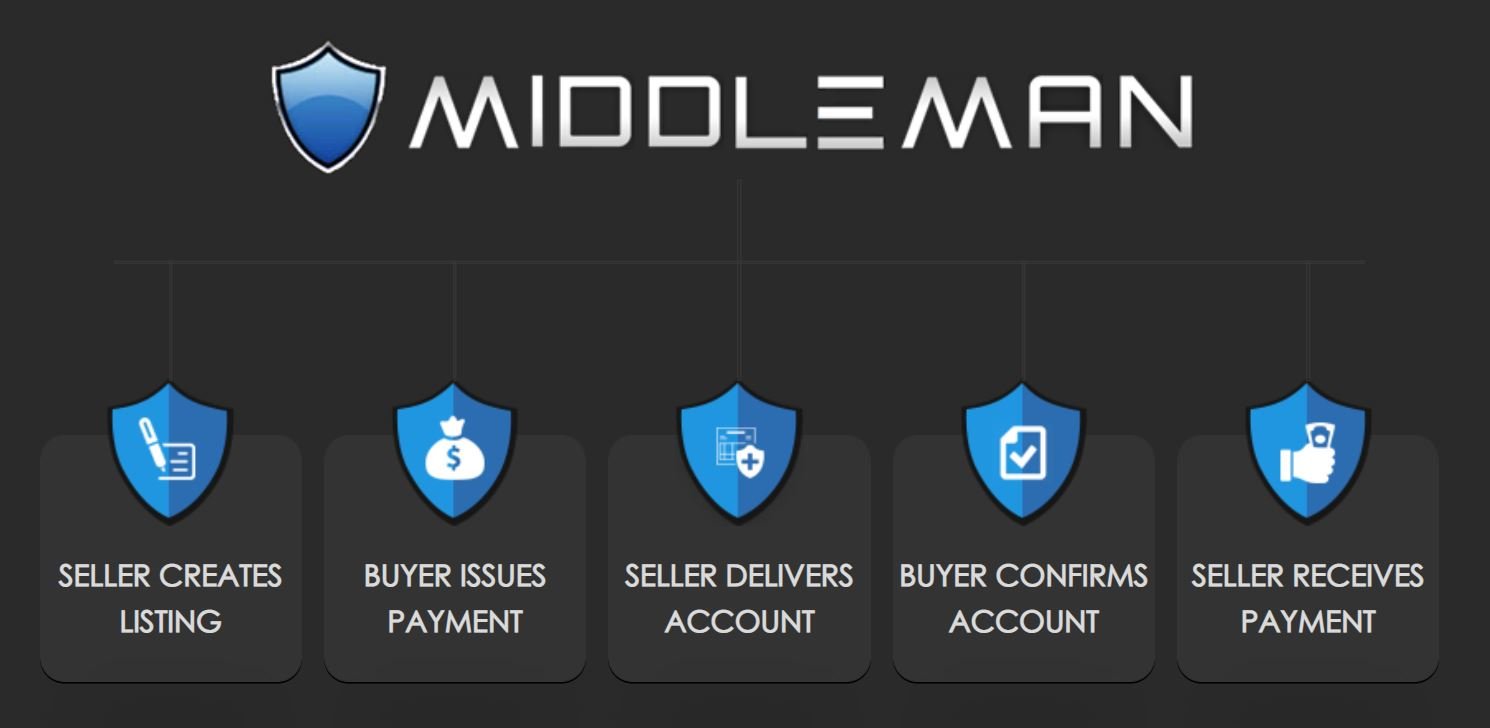
How does middleman services work to secure youtube account transactions?HideExpand

1). Sellers create and post middleman buy now listings for their youtube accounts.
2). Buyers click on a buy now middleman listing and complete payment.
3). PlayerUp verifies and secures the buyers payment holding it in escrow.
4). PlayerUp creates a 3 way conversation with the Buyer and Seller.
5). The seller then begins the transfer process sending their youtube account details along with transferring Admin access of the youtube channel over to the buyer.
6). During this process, PlayerUp will communicate and guide both the Buyer and Seller and answer any questions they have.
7). The buyer secures the youtube channel, updates the information on the youtube account and verifies the account they received is as described.
8). The payment held by PlayerUp in escrow is then disbursed to the Seller.

Accounts for Sale, Buy Account, Accounts

4.9 out of 5